Run the Library Statistics report
View a snapshot of library statistics, including data on circulations, holds, unpaid fines, materials, and patrons. You can see a summary of current statistics; for a specific number of years, months, days, or hours; or for a specified date range.
To run the report:
- Do one of the following:
Note: Access to the report from the Circulation tab requires the access level permission, View library information. Access from the Reports tab requires the access level permission, Generate library collection reports.
- Select Reports > Library Reports. Under Statistics, click Library Statistics.
- Select Circulation > Library Information > Statistics sub-tab.
At the top of the page, you can view a snapshot of library statistics.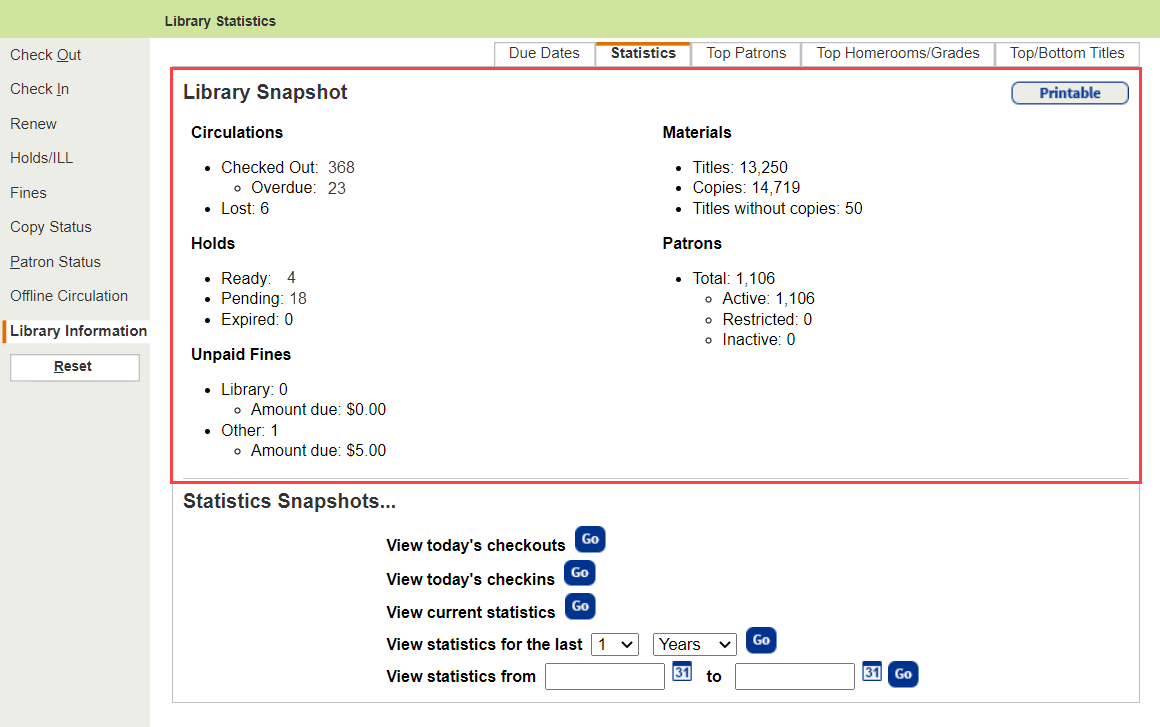
-
Do any of the following:
If you want to view...
Then... A summary of current data on circulations, materials, holds, patrons, and unpaid fines
See the Library Snapshot section at the top of the page.
A list of today's checkouts
In the Statistics Snapshots... section, next to View today's checkouts, click Go.
A list of today's check-ins
In the Statistics Snapshots... section, next to View today's checkins, click Go.
Current statistics for today, this month, or this year In the Statistics Snapshots... section, next to View current statistics, click Go.
Statistics for a specific number of years, months, days, or hours
In the Statistics Snapshots... section, next to View statistics for the last, use the drop-downs to select a number and timeframe. Statistics for a specified date or range of dates
In the Statistics Snapshots... section, next to View statistics from, enter a range of dates, or enter the same date in both fields to limit to one date.